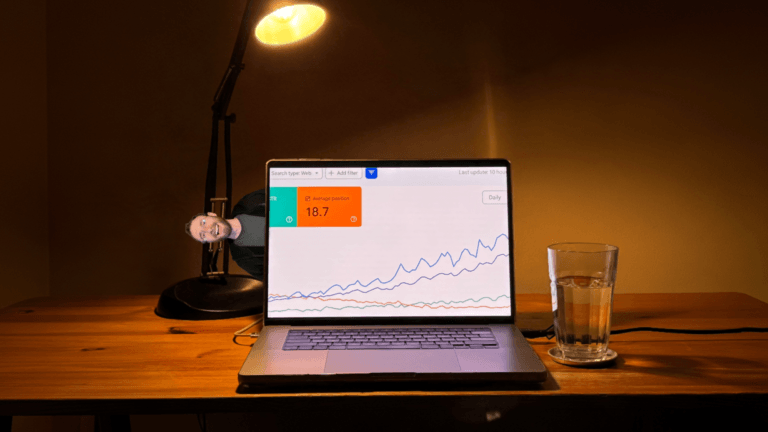
YouTube SEO visibility is blowing up so much that SEO tracking tools can’t even keep up.
They’re literally bugging out:


And every other video platform is popping.
TikTok is blowing up.
Instagram is blowing up.
Facebook video is blowing up.
Even LinkedIn video is blowing up.

So this is how to get started with short-form video – written by somebody who’s posted a short-form video every day since Nov 1, 2022, without missing a single day.
My viral content spreadsheet
One of the most low-hanging fruit wins anybody can do right now is to track viral videos in your niche.
Create a spreadsheet.
Use the columns: Hook, Topic, URL, Benefits Named, Topic Category

Go through all the creators in your niche. Sort their short-form videos by most popular. Exclude trending news videos because those are not evergreen.
Write everything down with extreme detail.
You literally train yourself in:
- Hooks that are proven to work
- Subject matter that is proven to be interesting
- Language to describe that subject matter that is proven to be easily understood
You can spend 30 minutes making 2 videos that are not informed by what people want, or you can spend 30 minutes making 2 videos that are informed by what people want – and do a lot better.
Reusing videos across platforms
If you’re just starting with video, use this tool. It makes it so you put up a video from one place (like TikTok or Instagram) and the video automatically comes out to every other major video platform – without you posting manually.

When I started, that’s what I was using. I just wanted to get into the habit of posting videos daily (daily posting is most important). That tool made it so my videos released everywhere.
When you’re ready to take things a bit more seriously, consider posting manually.
The way to maximize reach on each of the major video platforms is to post manually.
Here is exactly how I post my short-form videos.
You can also get a VA. I have friends with massive audiences who have VAs at $400/month post manually for them using VPNs set to the United States. The VPNs may not even be necessary though:
- I have a global audience, but the majority of my audience is in the United States.
- I routinely post from abroad, never with a VPN.
- I started my accounts with an Italian SIM card while living in Spain. Not long after that, I moved to Warsaw for a few months. My first six months of posting were all outside the United States and I still got phenomenal reach in the United States.
But if you’re just starting, use this tool. Your videos will come out to every platform automatically, saving you time, growing your brand on each platform, and maximizing SEO visibility (the same video will show up from multiple platforms within a Google search results page).
The one exception is Facebook. Meta has a native feature to automatically cross-post Reels from Instagram to Facebook; enable it. Since it’s done through Meta itself and not a 3rd party tool, there is no suppressed reach.
On LinkedIn, make videos come out to your personal page and not a company page. Company pages do WAY WORSE. I lost years of visibility on LinkedIn with this mistake.
Also – use the tool I share above to have your videos automatically back up to a Google Drive folder. The more videos you have, the more videos you can repost across platforms in the future – giving you infinite content.
How to do titles and descriptions for SEO
What you write for your video GREATLY helps it show up on Google and get cited in LLMs.
YouTube is the only video platform that has both a title field and description field.
TikTok, Instagram, Facebook, and LinkedIn all only have a description field.
- Easiest, fastest, dirtiest option: Before posting a video, spend 30 seconds doing stream-of-consciousness transcribed speaking for your description.
- Don’t even bother cleaning up your phone’s automatic transcription of what you say.
- The tool I shared in the previous section will make this the description for every platform (and in YouTube’s case, the title). Having more text for your description will make you show up more in search and LLMs.
- When you’re just starting and the algorithms don’t yet know your audience, you can get relevant followers this way who discover you via search engines or AI prompts.
- Second easiest option: Clean up your phone’s auto-transcription.
- A bit more advanced: If you’re editing with a tool that auto-transcribes your videos (I use Descript), use your transcript for your video description.
- What I do:
- I use my video’s transcription (manually cleaned up by me) as the description.
- For YouTube Shorts, the opening line of my video will typically be the title.
- Sometimes I slightly vary the title/description for each platform. As I said earlier, the same video can take up multiple spots in a search results page by being on each platform (YouTube, TikTok, Instagram, Facebook).
- For LinkedIn, I strip the description of any links. On LinkedIn, videos that have links in the descriptions get suppressed reach.
This is what I wish I knew
All of these are things I wish I knew when I first started making videos every day over 3.5 years ago.
If you’re just starting with video and you do these things, you will get reach way faster than other people who are just starting and don’t know any of this.
Find high-purchase-intent searches to rank for with video
If you want to go deeper into video SEO, I have a section on it in my 13.5-hour SEO course, Compact Keywords.
I also show you how to find high-purchase-intent searches that people are doing, looking to purchase exactly what you sell right now – these searchers just don’t know your brand exists.
You show up for a high-intent search, explain why you are a good brand for the thing the high-intent searcher is looking for, they say, “Wow, this is exactly what I’m looking for,” and they purchase. You don’t need to warm them up because they’re already warm. They just needed to know your brand exists and you can do what they’re looking for.
Get the course at https://edwardsturm.com/compact-keywords/